Navigation: Application Components > Dialogs >
Favorites Dialog


|
Navigation: Application Components > Dialogs > Favorites Dialog |
|
Favorites are a handy feature in Ultra Recall providing quick access to your most-used Info Items.
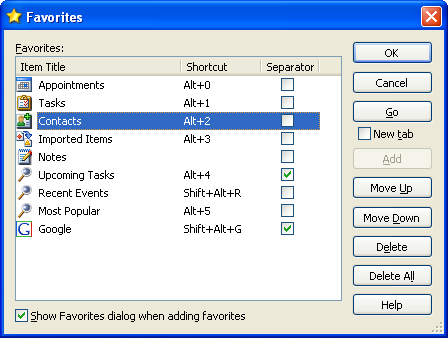
From this dialog you can add the Info Item currently selected in this Info Database, assign a shortcut to your favorites, rearrange or add separators between favorites, and delete one or all favorites currently assigned.
| • | Click on the Shortcut cell for a favorite (or press F2 or F4) to change the shortcut for the selected favorite. |
| • | Click the Separator checkbox (or press Space bar) to add or remove a separator before the selected favorite. |
| • | Click the Toolbar checkbox to add or remove the selected favorite from the Favorites toolbar. |
The buttons on the right side of the dialog provide access to all Favorites related features:
| • | OK: Accept all changes made to favorites. |
| • | Cancel: Discard all changes made to favorites. |
| • | Add: Add the selected Info Item as a new favorite. |
Note: this button is only enabled if the current Info Item is not already a favorite).
| • | Move Up: Move the selected favorite up in the list. |
| • | Move Down: Move the selected favorite down in the list. |
| • | Delete: Clicking this button or pressing Delete will delete the selected favorite from the list. |
| • | Delete All: Delete all favorites currently defined. |
Notes: